
Preparing an e-poster for SOA: tips from a past presenter
Presenting at the biggest event in the intensive care calendar can feel like a daunting task - especially if it’s your first time. Last year, a member of our community, Stephanie Westwell, stepped up to the podium at SOA25 to present an e-poster on nursing education and competencies. To help future presenters feel prepared, Steph has shared her first-hand experience, from the initial data gathering in PowerPoint to the five-minute presentation buzz.
Steph’s Experience Presenting at the SOA Congress
Last year I presented an e-poster with a team of colleagues at SOA25, my first time presenting at the Congress, and it’s fair to say I was slightly apprehensive about it to start with. The biggest event in the intensive care community calendar was not a small thing to tackle.
In hindsight though, I needn’t have worried, it was overall a very positive experience. Here’s what it was like.
The project itself
Our e-poster (in the image below) was based on our role in the newly formed Education Support team, meant to address concerns with changes to the unit, and training new nurses. As a team, we follow GPICS guidelines and used the recognised Step 1 Competencies for Critical Care, as well as Step 2+3s for the Critical Care course. We tracked total staff completion and percentages of staff training every month for a year and used the data to help evidence the outcomes of the team’s role. We also used questionnaires and feedback to provide evidence.
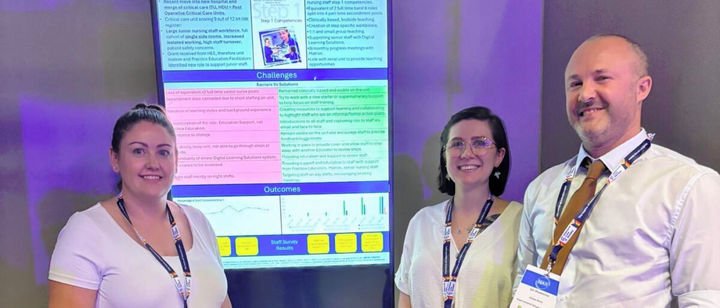
Putting together your e-poster
Making the poster was easy by using PowerPoint and dividing into four sections: Why, How, Challenges vs Solutions, and Outcomes.
One thing I’d advise on is don’t make your poster too wordy! Stick with a colour theme to keep it easy to look at and read but use an image and some colour to add visual interest.
Gathering the data was probably the most time-consuming part; creating the poster afterwards only took a few hours. We made a couple of drafts, a few people gave us useful feedback (thanks Ned!), and it was ready for submission!
Submitting your e-poster
This link offers guidelines including formatting information, how to prepare your e-poster and how to submit. Make sure you have a look at this!
Here you can find details of last year’s abstracts supplementary list.
Having your e-poster accepted
We got an email to say our poster had been accepted, and we replied confirming one of us or more would present at SOA.
We had a mild panic on the day as I hadn't re-submitted the poster for upload (I missed the email) but this was kindly sorted out by the ICS team. So make sure you have a backup copy with you just in case!
Presenting your e-poster
This was only 5 minutes, with 5 minutes allowed for questions. There were about 10 people listening, as there are many posters presented at the same time, so it wasn’t intimidating at all.
An ICS member was there to observe and time the presentation, then all presentations were judged. And if you win, you have another opportunity to present again at greater length.
And that was it!
I'd definitely recommend submitting a poster if you do have to opportunity, it's an achievement I'm proud of and am glad I had the opportunity to do.
Submit your abstract, and find more information on abstract catagories, see here: